textures: 16×16px, up to 64 colors each (including transparent)
maximum sprites: approximately 880 (no limit per scanline)
sprites can be scaled down independently on both axes
double-buffered (sprites are displayed 1 frame after being rendered)
Part 1: Sprite Rendering
Sprites are rendered from data in Sprite Ram, to a bitmap framebuffer.
Sprite Ram consists of 4 banks of 1024 Sprite Entries.
Each entry consists of eight words, and represents one sprite (and/or a command that sets graphics parameters, and/or set the scroll positions, and/or jump destination ).
On each frame, the FDP iterates over the sprite entries, starting at index 0 of the current bank (but the current index and bank can be changed using commands and jumps). Each entry takes 128 pixel clock cycles to process (thus, we can theoretically render 432×262/128 ≈ 884 sprites per frame. Though in reality the last few are rendered incorrectly). It is assumed that sprites are double-buffered (i.e. the sprites we see were rendered on the previous frame).too long
most games use banks 0 and 2 as a double buffer (note: unrelated to the framebuffer) i'm not sure whether there is a reason for this or not.
note the draw priority of sprites (later sprites are drawn over earlier ones)bank number is maybe not a correct abstraction. the odd-numbered banks act very differently from the even-numbered ones, needs more testing. see notes.
Individual sprites can be tiled into larger blocks by using the Block Controls.
There are two scroll values, which we call "global" and "subglobal".
These can be changed at any time, and you can choose which ones (global only, global+subglobal, or neither) to use for each sprite.
Note that sprite rendering itself is not affected by any lineram settings.
explain command mode better. note the consequences of setting it on a visible sprite (field 5's value is used for 2 things at once)
The order of operations when processing a sprite entry is:
read position from sprite ram
process Set Scrolls (modifying scrolls)
process Enable Scrolls (adding scrolls to position)
process Multi (setting block origin, reading zoom)
process X Block Control and Y Block Control (overriding x and/or y position)
(read the palette, texture id, flip etc.)
render the sprite
save the positions of the left/right/bottom edges of the sprite
process Jump (choosing the next sprite index)
process commands ? (setting the bank, etc.) does this take effect at the very end, or sometime during the current sprite entry?
change our styling so that instead of styling <p> we style <section> or something
Sprite Entry
Address ($600000+)
⋯,0,0,0,bank:2,index:10,w:3,-
bank
bank number (set by command)
index
sprite index
w
field number
Data[0]
texture:16
texture
Texture Id (lower bits)
Data[1]
yzoom:8,xzoom:8
xzoom
X Zoom
X Zoom (in screen pixels per texture pixel) = 1 − xzoom/256
Example sizes:
$00
16px
$40
12px
$80
8px
$C0
4px
$FF
0.0625px
yzoom
Y Zoom (same format as X) iirc, one axis is positioned with subpixel precision while the other isn't. they're also downscaled differently (even though the actual zoom values are the same) check which is which
Data[2]
i:2,s:2,x:12
x
X Position (in screen pixels)
s
Set Scrolls: which scroll values to write the position to
0
(none)
1
subglobal
2
global
3
global and subglobal
i
Enable Scrolls: which scroll values to add to the position
0
global and subglobal
1
global
2
global and subglobal (yes, really)
3
(none)
Data[3]
c,?:3,y:12
y
Y Position (same format as X)
c
"Command":
0
normal
1
write the contents of field 5 to the Sprite Settings register
Data[4]
x:2,?,y,M,p,v,h,pal:8
pal
Palette Id (256-511) = 256 + pal
h
1
horizontal flip
v
1
vertical flip
p
palette lock
1
reuse palette from previous sprite
0
use new palette
M
"Multi" - this bit affects the next sprite, not the current one
0
write the current position to the Y Block Origin, and read the zoom values
1
don't
y
Y Block Control - set y position to:
0
Y Block Origin (note: if Multi was 0, this will be the current position)
1
below previous sprite
x
X Block Control - set x position to:
0
current position
1
same as previous sprite
2
right of previous sprite, except first row renders at current position
3
right of previous sprite
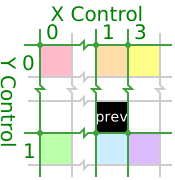
There are effectively 6 possible combinations of x and y block controls:
(note: in this chart, the left side is the given x position, and the top side is the y block origin)
Note that sprite blocks are intended be in column-major order, because there is no way to position a sprite directly to the right of the previous one.
Generally, games only use rectangular sprite blocks, using 3 combinations of block controls:
(0,0) for the first sprite in the block (along with setting multi=0 on the previous sprite)
(3,0) for the first sprite in each subsequent column
(1,1) for the rest of the sprites
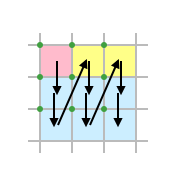
Typical 3x3 sprite block, showing the order of the sprites and their block controls (as color):
Only the first sprite (red) has a positon set in ram. clean this up and also show the actual sprite ram values for the example
Data[5]
.:8,fmt:4,?,?,tex2:2
tex2
Texture Id (upper bits) - this might be more than 2 bits
fmt
bitmap format? - affects the order of pixels loaded from rom?
note: this value of this field is reused to set the sprite settings register.
Data[6]
j,.:5,dest:10
dest
jump destination
j
Jump: determines next sprite index:
1
jump to dest
0
current index + 1
Data[7]
(unused?)
Sprite Settings Register
(set by a "Command" sprite)
Data
?,?,k,j,?,b0,bpp:2,?,a:3,?,?,t,b1
b1
spriteram bank number (upper bit)
t
supposedly disables clearing framebuffer but seems to be something else
a
affects visiblity of sprites or something
bpp
texture bit planes what is the mapping?
b0
spriteram bank number (lower bit) when switching from bank 0 (or 2) to 1 (or 3), the effect is delayed until the next frame. in the other direction, the effect is immediate. also, we always switch back to bank 0 or 2 if we started the frame in bank 1 or 3.this is weird. i.e. we can't be in an odd bank for 2 frames in a row.
j
if this is 1, the lowest bit of the texture id of all pivot layer tiles is treated as inverted (e.g. 44->45, 45->44), and also it slightly changes the video signal timings, so i can't get a good recording with my setup. seems like this must be set near the start of the frame (sprite index ≤ 16) to take any effect. (and in that case you will see
k
1 = flipscreen
Part 2: The Sprite Layer
The contents of the sprite buffer are drawn to the screen as the Sprite Layer.
Sprites are divided into four "groups" (based on the 2 uppermost bits of their palette.) In some ways, the sprite layer acts like 4 separate layers, because some settings can be set per-group (Priority, Blend Mode, and Alpha Select). However, note that sprites can never blend with each other because they share a single framebuffer.
rather:
You could think of it either as four graphics layers which use pixels from a shared framebuffer, or as one layer where some settings can vary based on which Group each pixel is in.